Priority data plays a central role in protection right management. In Continux, it can be recorded automatically or manually and displayed by the system, in the file itself and in the family tree. This article shows when and where the priority is visible, and when it is not. |
Automatic display (via the “Prionachanmeldung” workflow) If a follow-on filing is created via the workflow, Continux transfers the priority automatically. It appears: – in the “Attachments, Family, Conflicts” tab of the follow-on filing – in the family tree as a linked case The data such as file reference, priority date and country are transferred. |
Docketing priorities manually – internal periority vs. external priority System-internal priorities are links to other Continux cases. They are visible in the tab and appear in the family tree, but only if they have been entered in both cases. External priorities concern third-party protection rights. They are displayed only in the target case, not in the tree. There is no automatic linking. |
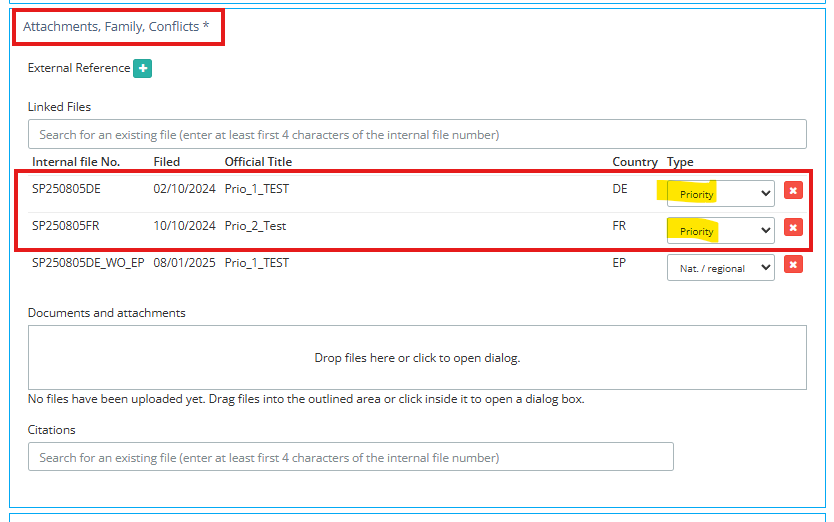
| Where can the priority be seen? In every case, the priority can be found in the “Attachments, Family, Conflicts” tab. There you will see: – for an internal link: the referenced file – for an external priority: the manually entered data |
Example view: Case view (in edit mode) under “Attachments, Family, Conflicts”: |
 |
Example view: Graphical view of the family tree |
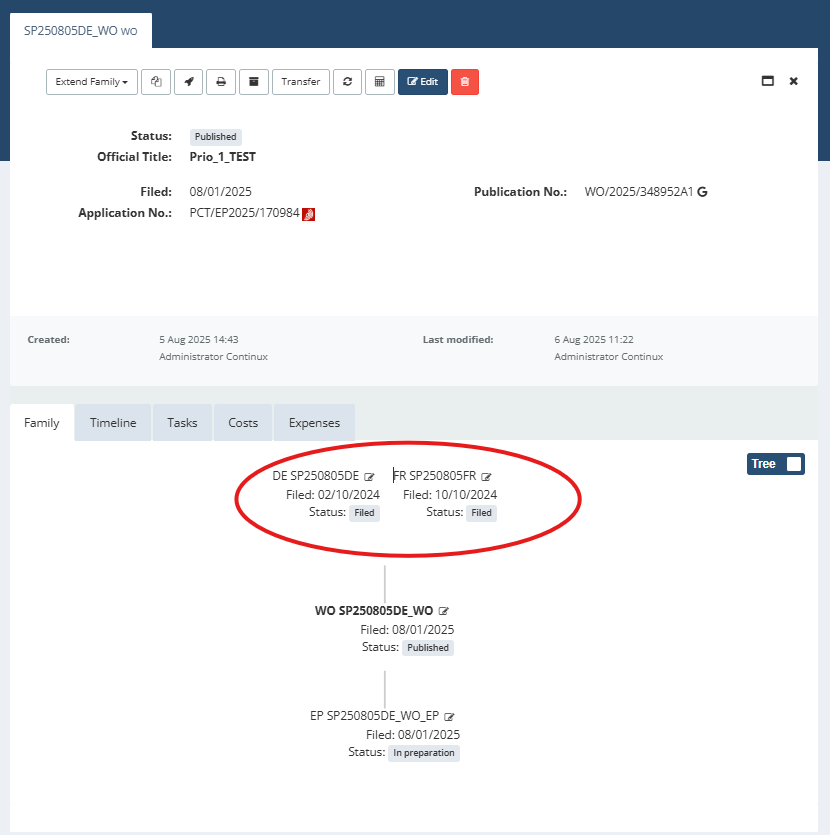 |
| Note: Only correctly linked system-internal priorities are shown in the family tree. The structure presents all relevant predecessor relationships chronologically, including multiple priorities or multi-level links. External priorities are not visible in the family tree. |
When is the priority not displayed and/or not correctly placed in the family tree? – External priority: not visible in the family tree – Manually linked/entered in only one file: no correct position display in the family tree – No workflow or no manual entry: no display – No access to source case: display may be restricted |
Additional options: note field, tags and expert search If the priority is not visible in the system, for example for external protection rights, it can be documented manually in the note field. The information appears in the file overview directly below the bibliographic data and is immediately visible. If several files are affected, the entry can be copied easily. In Continux, external priority data can also be stored as a tag in a consistent format. If the same tag is used in several cases, all affected cases can be found via expert search. Example: tags:DE/102020123456/2020-04-15. This makes the priority searchable across cases, even if it is not linked systemically. |
| Summary Visibility depends on the method of recording. Automatically created or correctly linked internal priorities appear in the case and in the family tree. External priorities appear only in the case. If no structured display is possible, the note field, tags and expert search help. |
Further information and articles: ➔ Priority data in Continux – basics and overview ➔ Creating a Subsequent Application Prio in Continux via “Subsequent Application Prio” Workflow ➔ Manual Docketing of Priorities in Continux ➔ The Continux expert search - an overview |
War dieser Artikel hilfreich?
Das ist großartig!
Vielen Dank für das Feedback
Leider konnten wir nicht helfen
Vielen Dank für das Feedback
Feedback gesendet
Wir wissen Ihre Bemühungen zu schätzen und werden versuchen, den Artikel zu korrigieren