In Continux, ideas, inventions, and IP rights (patents, etc.) are managed under the menu item Files. Depending on the licensed version, the following sub-areas may be visible: | |
Ideas - an area for inventors. Ideas are submitted internally here. Inventions - invention disclosures are shown here, either submitted by inventors and/or created and edited manually by patent administration. Patents - all patent applications and granted patents are managed here. Note: Not all modules are visible in every version. Access to Ideas, Inventions, or Patents depends on the respective permissions and the licensed configuration. | 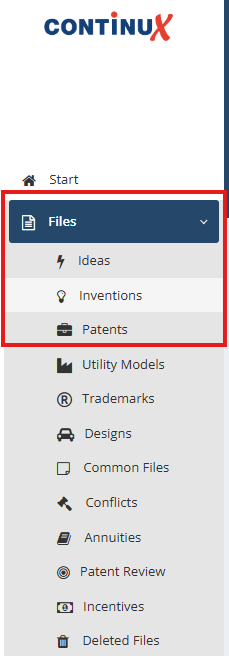 |
Important: File references in Continux. Each file reference can only be assigned once system-wide in Continux. Invention disclosures and patent files therefore must use different file references. It is recommended to use a separate abbreviation for invention disclosures, for example INV:
| |
Create a patent file without a filing date | |
If a patent application was mistakenly created under Files → Inventions, the invention must be deleted and a new file must be created under Files → Patents; all information must then be transferred manually. How to delete files correctly from the system is explained in the related article below. | |
Further links and articles: ➔ Creating a new file in Continux – an overview ➔ National patent – create a file in Continux | |
War dieser Artikel hilfreich?
Das ist großartig!
Vielen Dank für das Feedback
Leider konnten wir nicht helfen
Vielen Dank für das Feedback
Feedback gesendet
Wir wissen Ihre Bemühungen zu schätzen und werden versuchen, den Artikel zu korrigieren